

When you create an interactive map with lots of locations, filters help visitors find what matters to them. But how should you organize those filters? Should you use categories, custom fields, or a combination of both?
Sometimes the answer is straightforward: categories are ideal for grouping locations by type, while numeric custom fields let people filter by measurable values. Other times, both options can work. For example, you could let visitors choose a property size range from a list of categories, or use a slider to select the exact range they want.
Let's look at when each approach makes sense, the trade-offs, and examples you can explore for yourself.
The quick answer: types vs. measurable values
Use categories when visitors need to choose what kind of place or feature they are looking for:
- Property type: Office, Retail, Industrial
- Amenities: Parking, Accessible entrance, Loading dock
- Venue type: Hotel, Conference center, Outdoor venue
- Volunteer activity: Education, Environment, Community support
Use numeric custom fields when visitors need to specify how much, how big, how many, or how long:
- Property price or floor area
- Monthly rent or number of bedrooms
- Event venue capacity
- Trail length or expected duration
- Number of available volunteer positions
For many maps, the best answer is both: categories for meaningful groups and custom fields for numeric ranges.
See the difference: the same real estate map, two approaches
We built two versions of the same commercial real estate portfolio map, using the same locations and data. The difference is how visitors filter by price and property size.
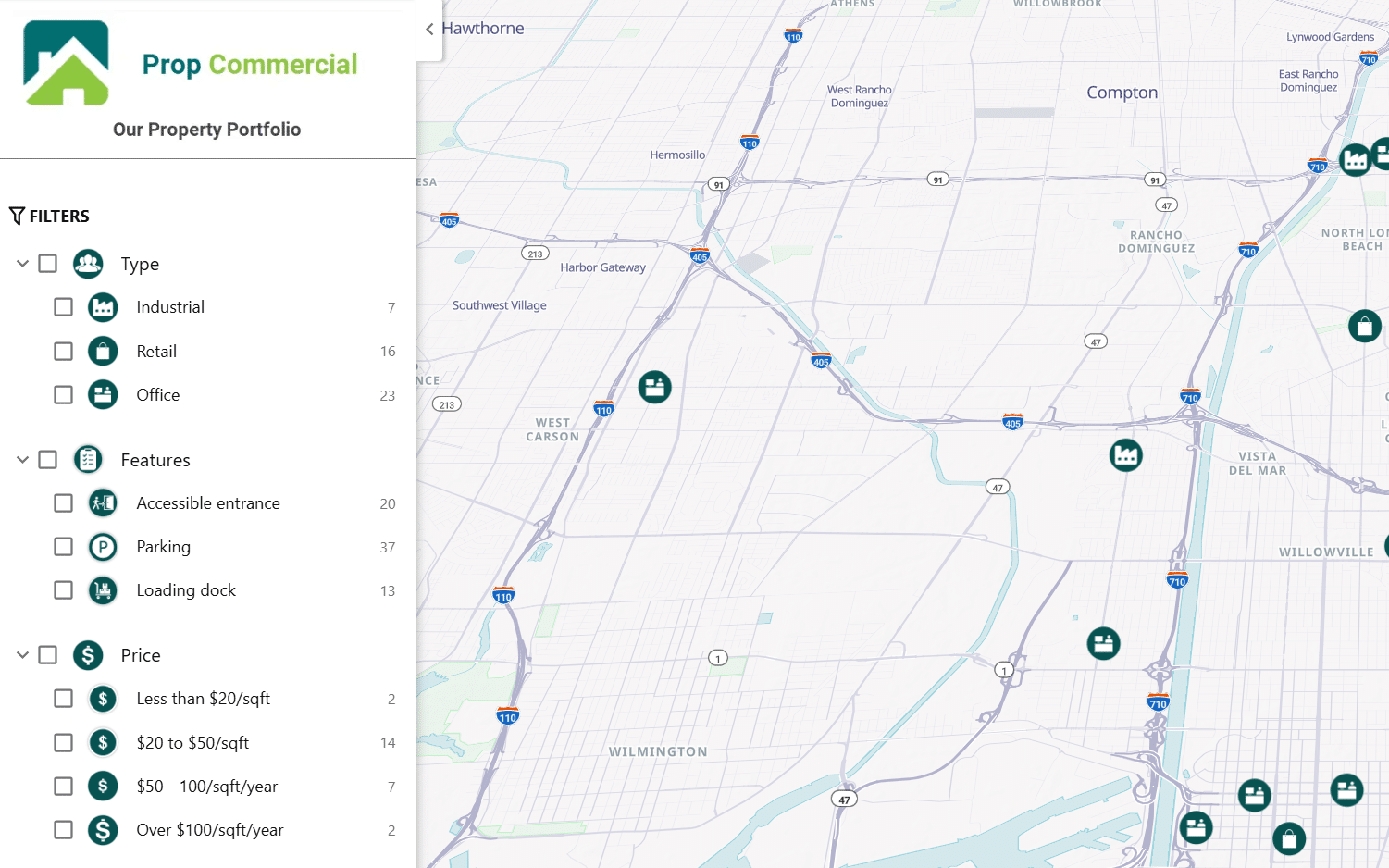
Version 1: Categories for everything
In this version, property type and features appear as categories. Price and size are also presented as predefined category groups, for example, price bands such as $20–$50 per sq. ft. and size bands such as 5,000–15,000 sq. ft.
What works well: Visitors can quickly scan the available options, see the number of matching locations beside each group, and choose a familiar range with a click.
The limitation: Visitors must work with the ranges you defined. Someone looking for a space between 8,000 and 12,000 sq. ft. cannot select that exact interval using these preset size categories.
Version 2: Categories plus custom fields
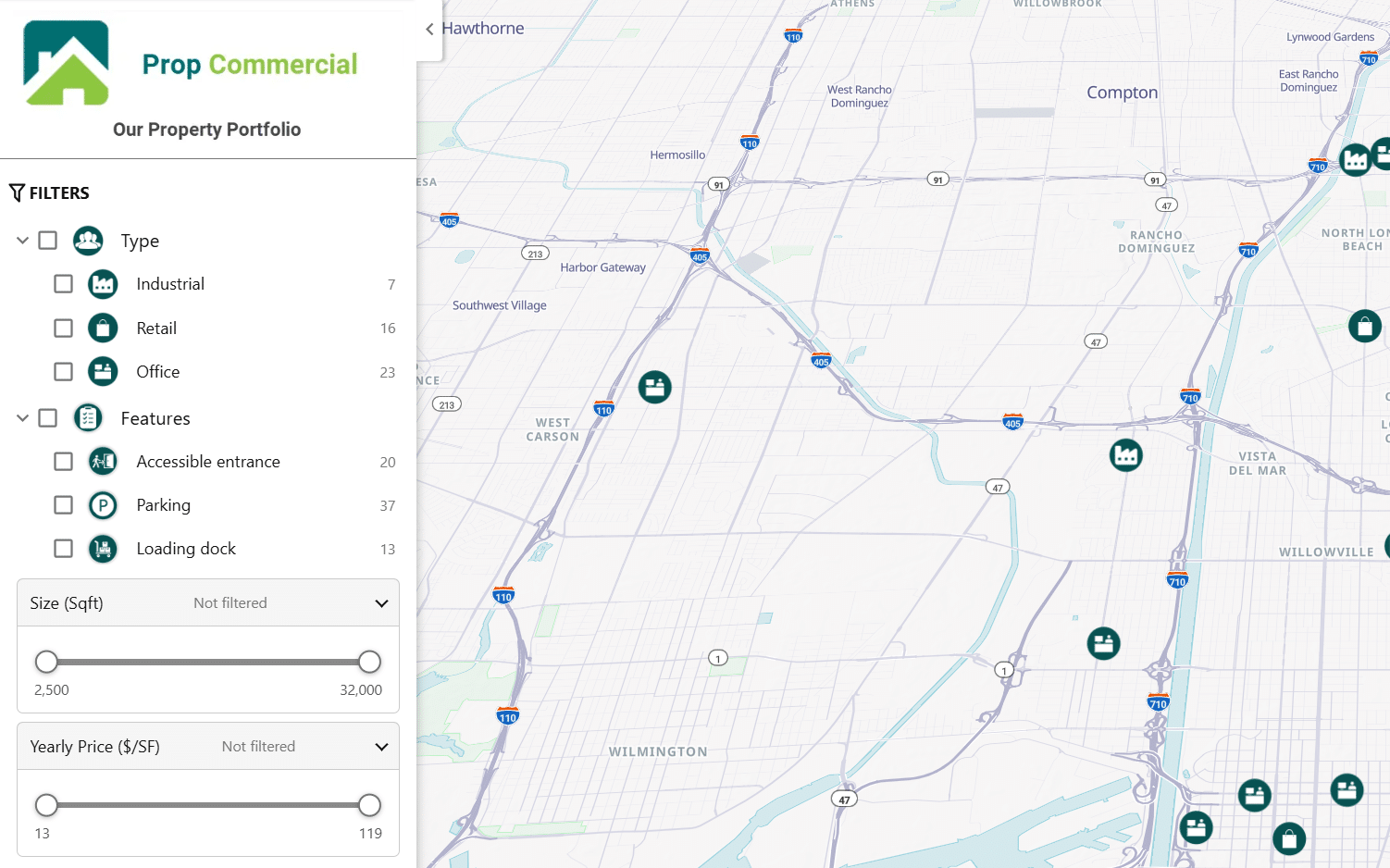
Here, property types and features remain categories, but Size and Yearly Price become numeric custom fields with range sliders.
What works well: Visitors can define ranges that match their own requirements instead of choosing from fixed bands. You store the underlying numeric value once, so updating a property's size or price does not require manually moving it between range categories.
The trade-off: Sliders ask visitors to interact with the filter to choose a range. Preset categories make the available price or size bands, and their counts, more immediately visible.
Try both maps: Imagine you need an office of roughly 10,000 sq. ft. within a specific price range. Which filtering experience helps you narrow the results more naturally?
When the choice is less obvious
1. Price, size, and budget: fixed bands or flexible ranges?
These are measurable values, but that does not automatically mean custom fields are the only good option.
Choose categories when:
- Your audience thinks in a few familiar tiers, such as Budget, Mid-range, and Premium.
- You want every available range visible at a glance.
- You want visitors to see location counts for each predefined band.
Choose custom fields when:
- Visitors have individual minimum or maximum requirements.
- Values cover a wide range or change frequently.
- You want to avoid creating and maintaining many price or size categories.
Our recommendation: Use custom fields for most property prices, rental budgets, and floor areas. Choose categories when the bands themselves have a clear meaning for your audience.
2. Small numbers: bedrooms, ratings, or capacity
Suppose a residential property map has homes with one to five bedrooms. You could use categories labeled 1 bedroom, 2 bedrooms, and so on. These choices are easy to recognize and select.
But if your map contains venues with capacities ranging from 20 to 20,000 people, creating useful capacity categories becomes harder. A numeric range filter is usually a better experience.
Rule of thumb: If there are only a handful of meaningful choices, categories may be simpler. If visitors need flexible numeric thresholds, use a custom field.
3. A number vs. a label with meaning
Consider event venues:
- Small, Medium, Large are descriptive groups. Categories are a natural choice, especially if you define size by experience rather than a strict number.
- Capacity: 50–250 guests is a measurable requirement. A custom field is a better fit.
The same distinction applies to Beginner / Intermediate / Advanced hiking trails versus Distance: 3–8 km, or Short / Long shift versus Duration: 2–4 hours.
Sometimes both are useful: a trail could be categorized as Family-friendly while also having a numeric distance filter.
Categories vs. custom fields: pros and cons
| Consideration | Categories | Numeric custom fields |
|---|---|---|
| Best for | Types, features, labels, and predefined groups | Exact numeric values and flexible ranges |
| Visitor experience | Visible choices that are quick to scan and select | Sliders for setting personal minimums and maximums |
| Precision | Limited to the groups you create | Visitors can choose ranges within the data's available scale |
| Maintenance | A change in value may require changing a category assignment | Update the numeric value; no range reassignment needed |
| Additional map controls | Can influence markers, category views, and category-based presentation | Primarily store values and provide numeric filters |
| Potential downside | Many bands can make filters crowded | Less immediate visibility of preset choices and counts |
Keep in mind that Mapme's custom fields currently support numeric values. For labels such as Pet-friendly or Accessible entrance, use categories.
More examples across industries
| Industry | Use categories for | Use custom fields for |
|---|---|---|
| Residential real estate | Apartment, House, or amenities such as Pool and Parking |
Price, floor area, or number of rooms, when buyers need to set their own ranges. |
| Nonprofits and volunteer opportunities | Cause, activity, or required skills |
Available places, shift duration, or weekly time commitment, when relevant. |
| Events and hospitality | Venue type and amenities, such as Outdoor space or Catering available | Capacity or rental price, when event planners need a range |
| Parks and trails | Activities and difficulty levels | Distance, elevation gain, or estimated duration, so visitors can find routes that match their plans |
Why categories and custom fields often work best together
You rarely need to choose one approach for your entire map. Instead, decide which approach makes sense for each filter.
For example, a property portfolio could offer:
- Category: Property type - Office, Retail, Industrial
- Category: Features - Parking, Accessible entrance, Loading dock
- Custom field: Size - Choose a floor-area range
- Custom field: Yearly price - Choose a price range
Visitors can combine the categorical choices with numeric filters to focus on locations that meet their needs. In Mapme, custom-field range filters appear alongside categories in the filter panel; you can also use numeric custom-field values in location descriptions.
One practical tip: Do not turn every piece of data into a filter. Choose the few criteria your visitors are most likely to use, and keep the panel easy to navigate.
How to choose for your map
Ask yourself three questions:
- Is this a type or a measurable value? Types and descriptive features usually belong in categories. Measurements usually belong in custom fields.
- Do visitors need exact ranges? If yes, use a numeric custom field. If a few predefined options are enough, categories may be easier.
- Will the numbers change? If values are updated regularly, storing actual numbers in custom fields reduces the work of maintaining category bands.
Bottom line: Categories help people discover what is on your map. Numeric custom fields help them narrow down how much, how big, or how many. Use both when your visitors need both kinds of answers.
Ready to set up your filters? Explore our guides to Categories and Filters and Custom Fields and Range Filters.
Frequently asked questions
Can I use custom fields for text or Yes/No values?
No, not at the moment. Mapme's custom fields currently support numeric values. For labels such as Pet-friendly or Accessible entrance, use categories.
Should I use categories or custom fields for price and size filters?
For most property prices, rental budgets, and floor areas, numeric custom fields work best because visitors can set their own minimum and maximum with a slider. Choose categories instead when the bands themselves have a clear meaning for your audience, such as Budget, Mid-range, and Premium.
Can I use categories and custom fields on the same map?
Yes. In Mapme, custom-field range filters appear alongside categories in the filter panel, so visitors can combine both. For example, a visitor can pick a property type from the categories, then narrow the results with a price or size slider.
More answers are in the Custom Fields guide FAQ.